REAL-TIME PITCH DETECTION

Learn Accordion.
Interactive learning app that works with your own accordion.

Visual guidance for keys and buttons. Play along with real-time microphone detection – comfortably and at your own pace. Practice with the included interactive exercises.

See how it looks

Designed for every
accordionist

A direct visual link between your instrument and your screen — eliminating the friction of layout memorization.

Free Play C‑System sound map with real‑time pitch detection

Free Play & Sound Map

Play freely — every matching button across the entire fingerboard lights up instantly. A digital mirror that builds muscle memory without looking down.

Structured practice exercises button layout for C‑System accordion Structured practice exercises piano layout

Structured Practice

Fingering basics, scales, arpeggios, melodies, chords — with note-by-note verification, amber key hints, red-flash feedback, and star scoring.

Mobile‑friendly C‑System button accordion layout illustration Mobile‑friendly piano accordion layout illustration

Music Stand Ready

Viewport-scaled buttons for tablet landscape on a music stand. Compact or full layout, horizontal scroll, and live mic sensitivity control.

Customizable C‑System fingerboard canvas for button accordion Customizable piano accordion fingerboard canvas

Fully Customizable Canvas

Adjust the fingerboard position to match your screen and instrument setup. Fine-tune the mic threshold with a live volume meter.

Play on the Go

Accodrive scales beautifully to smaller phone screens. Open the app in your browser in either orientation to practice anywhere.

Portrait Orientation

Accodrive mobile portrait view of C‑System layout

Landscape Orientation

Accodrive mobile landscape view of button accordion layout
Experimental

Android App on Google Play

Prefer an installed app? An experimental native Android version is now available on Google Play as an alternative to the browser web app.

Web PWA

Browser Application

Run instantly in any modern browser without installation. Add to your mobile home screen as a Progressive Web App for full-screen practice.

Universal System & Kind Support

Interactive Fingerboards • 7 Layout Variations
Kind:
Auto-cycle
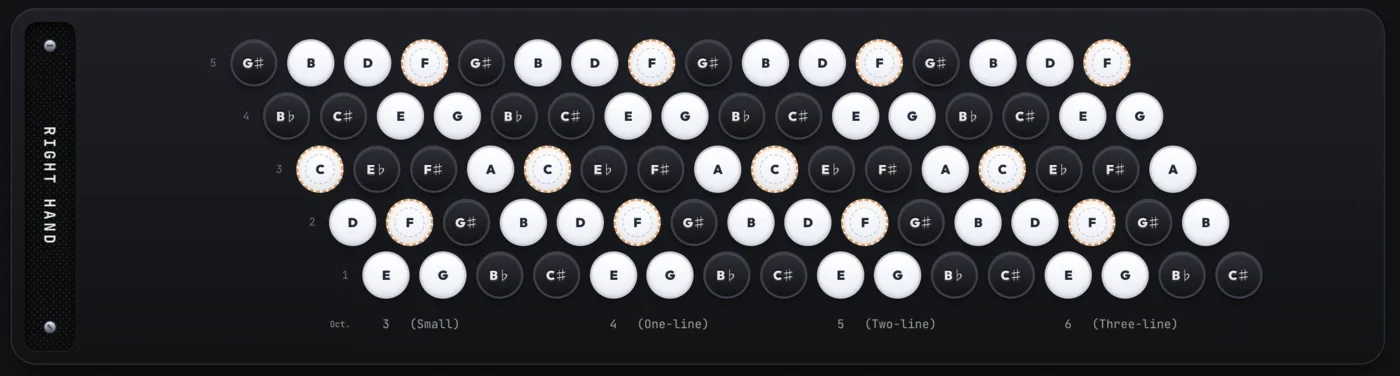
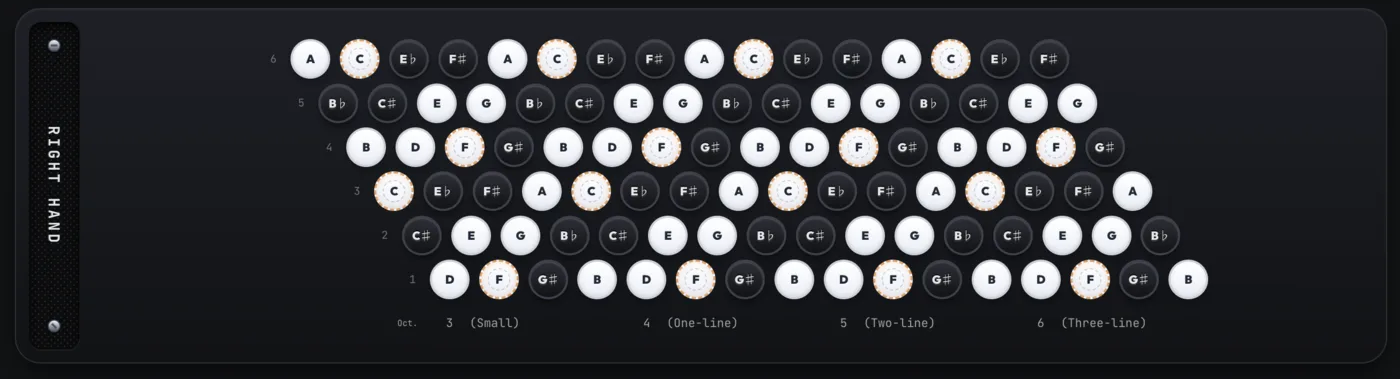
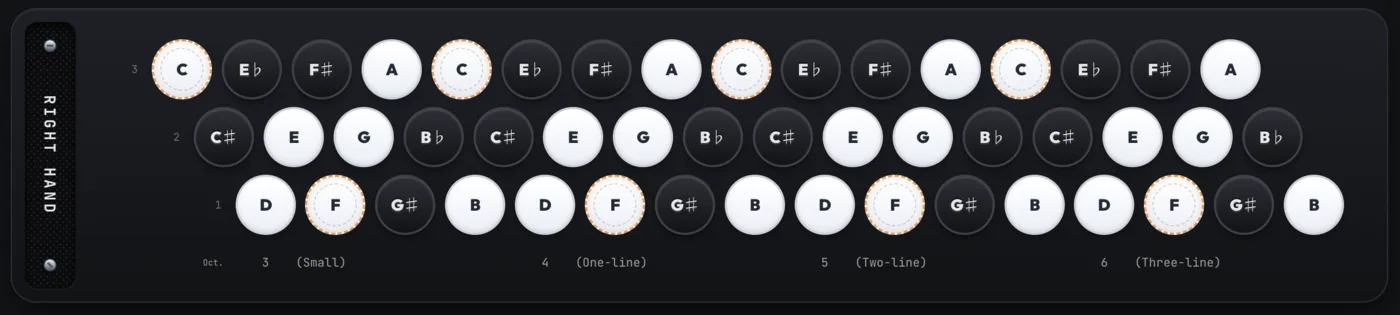
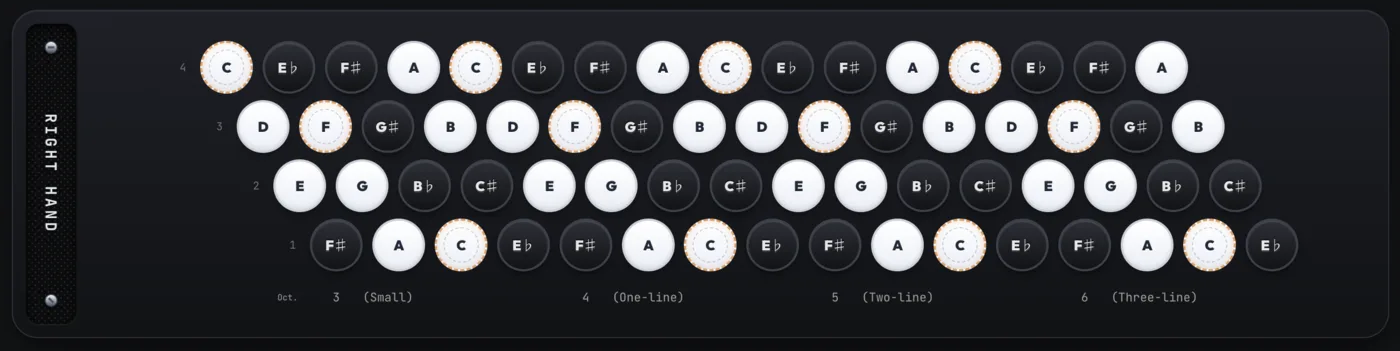
Standard C-System chromatic button accordion fingerboard French Musette 4-row C-System button accordion fingerboard Finnish 5-row C-System button accordion fingerboard Standard B-System chromatic button fingerboard Balkan 6-row B-System button accordion fingerboard Simple Bayan 3-row button accordion fingerboard Piano accordion treble keyboard
C-System • 5 Rows

Standard C-System (5 Rows)

The quintessential European chromatic layout. Features 3 primary rows plus 2 duplicate auxiliary rows (rows 4 & 5) for effortless transposition and alternate fingerings.

Designed for

C-System Traditions

From classic 5-row French/Italian accordions to 4-row Musette and Finnish fingerboards, Accodrive mirrors your instrument's exact physical geometry.

Designed for

B-System & Bayan Virtuosity

Full support for Eastern European and classical Bayan, featuring 6-row Balkan virtuoso grids and 3-row Simple Bayan layouts with responsive button scaling.

Designed for

Piano Accordion Keyboard

Piano accordion keys are mapped to a vertical music-stand view, preserving natural keyboard spacing and responsive pitch detection for both hands.

Intelligent Engine

Smart Kind Compatibility

Accodrive automatically checks if exercise fingerings fit your active kind, ensuring seamless learning without incompatible auxiliary row fingerings.

See it in action

Master Every Key & Fingering

Practice major, minor, and triad arpeggio exercises across all 12 keys with dynamic stave notation, ergonomic fingering guides, and real-time audio verification.
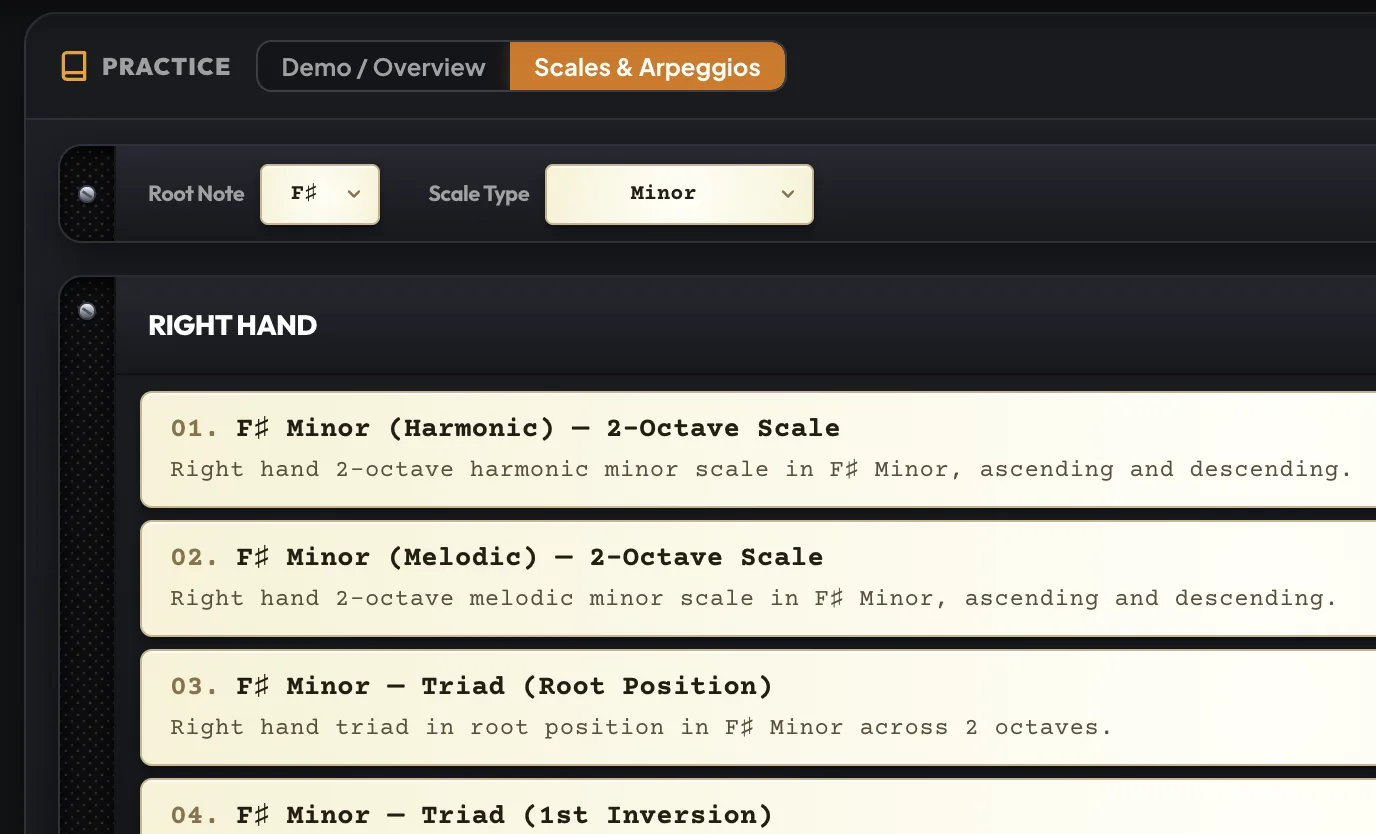
Scales and Arpeggios Exercise List and Key Selection in Accodrive

Comprehensive Scale & Key Catalog

Select any root note and scale type — Natural, Harmonic, or Melodic Minor, Major scales, and Triad arpeggios in root and inverted positions across 1 and 2 octaves.
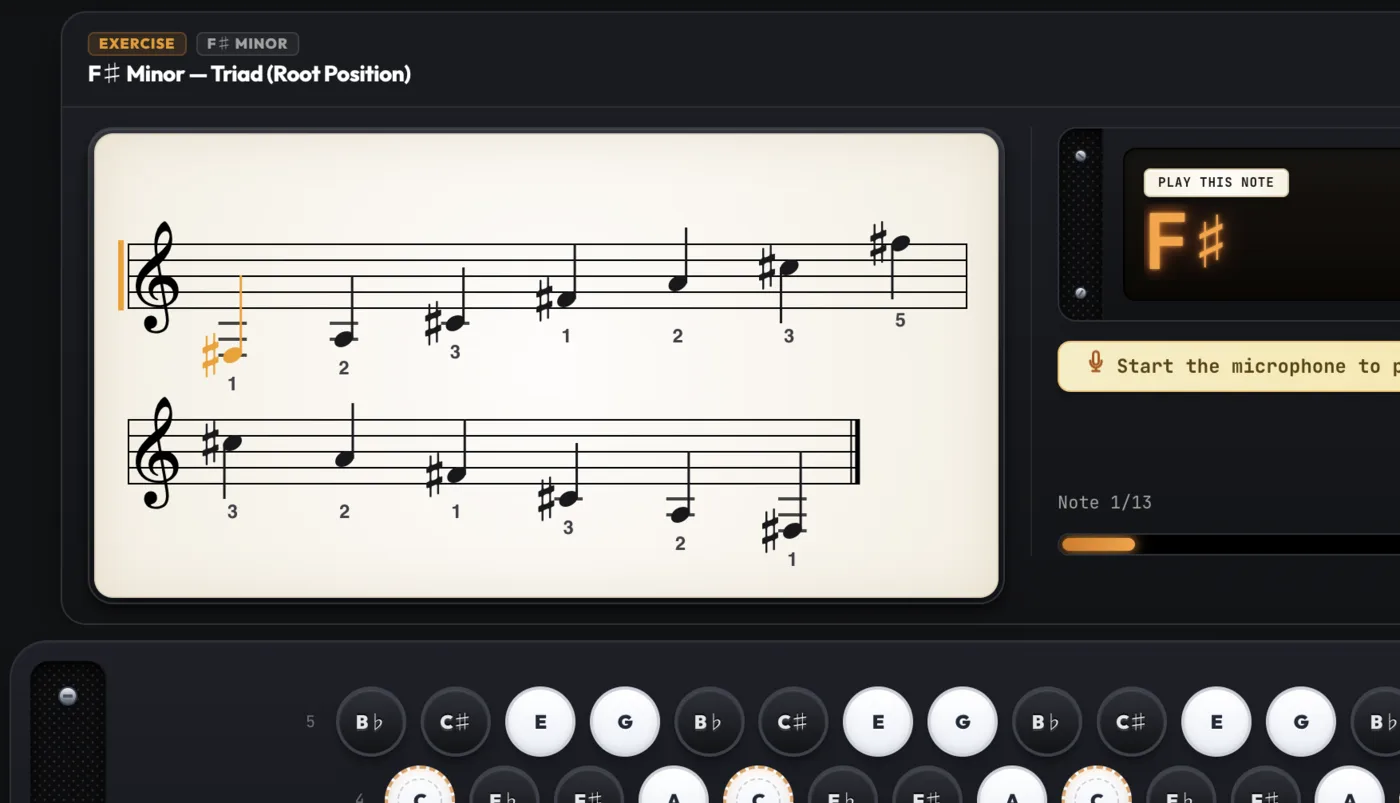
Interactive Stave with Auto-Fingering and Pitch Verification in Accodrive

Interactive Stave & Auto-Fingering

Follow live sheet music notation with ergonomic accordion fingerings (1–5) tailored to your layout. Pitch detection verifies your playing note-by-note with instant guidance.

Full Stradella Bass & Chord Support

Accodrive supports three right-hand systems (C-System, B-System, Piano Accordion) as well as left-hand bass/chord training and free play mode. Perfect for practicing each hand separately.
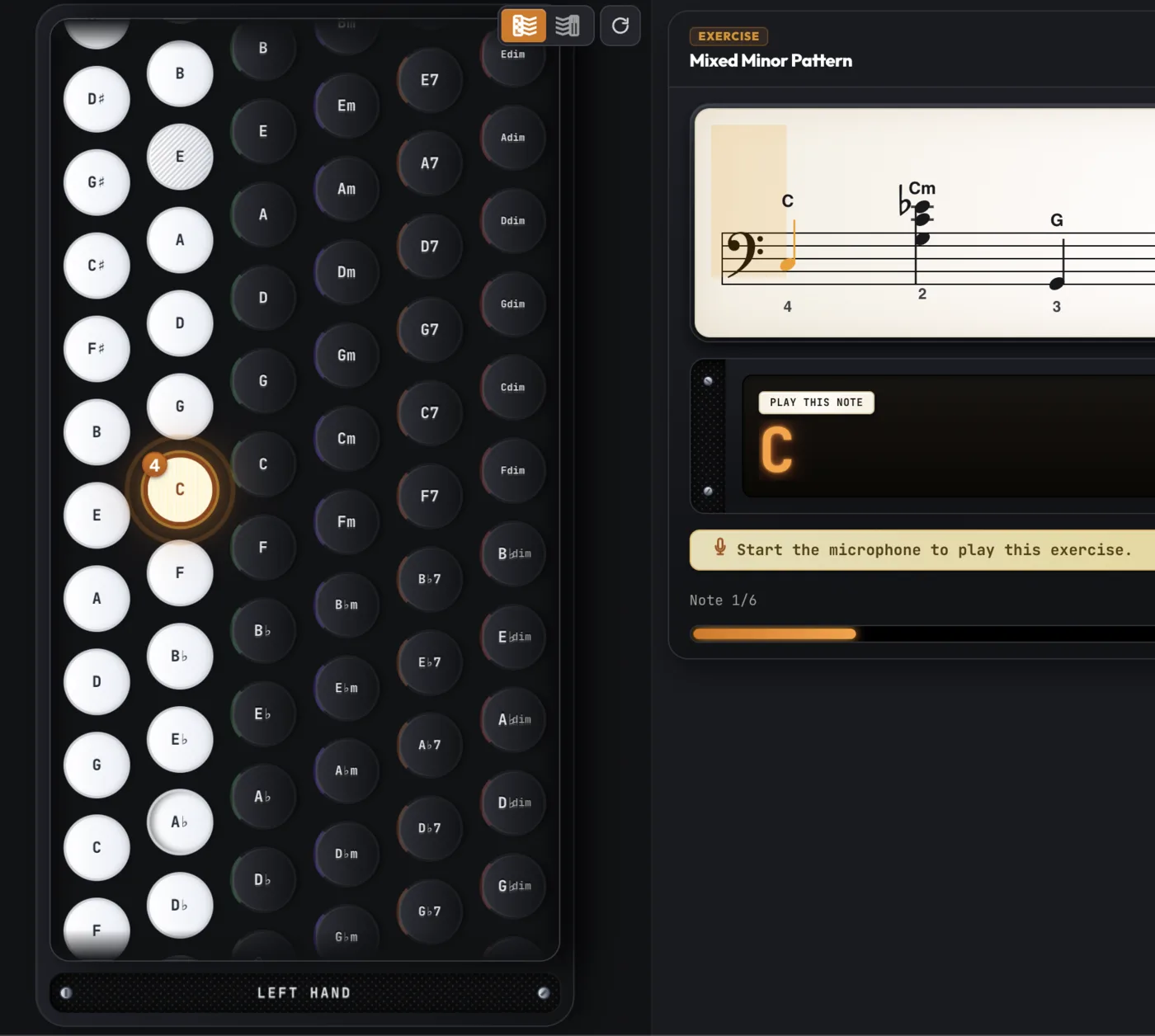
Stradella Left-Hand Single Bass Practice in Accodrive

Interactive Bass Practice

Master single bass notes and basic accompaniment patterns. Real-time feedback verifies your pitch accuracy note-by-note.
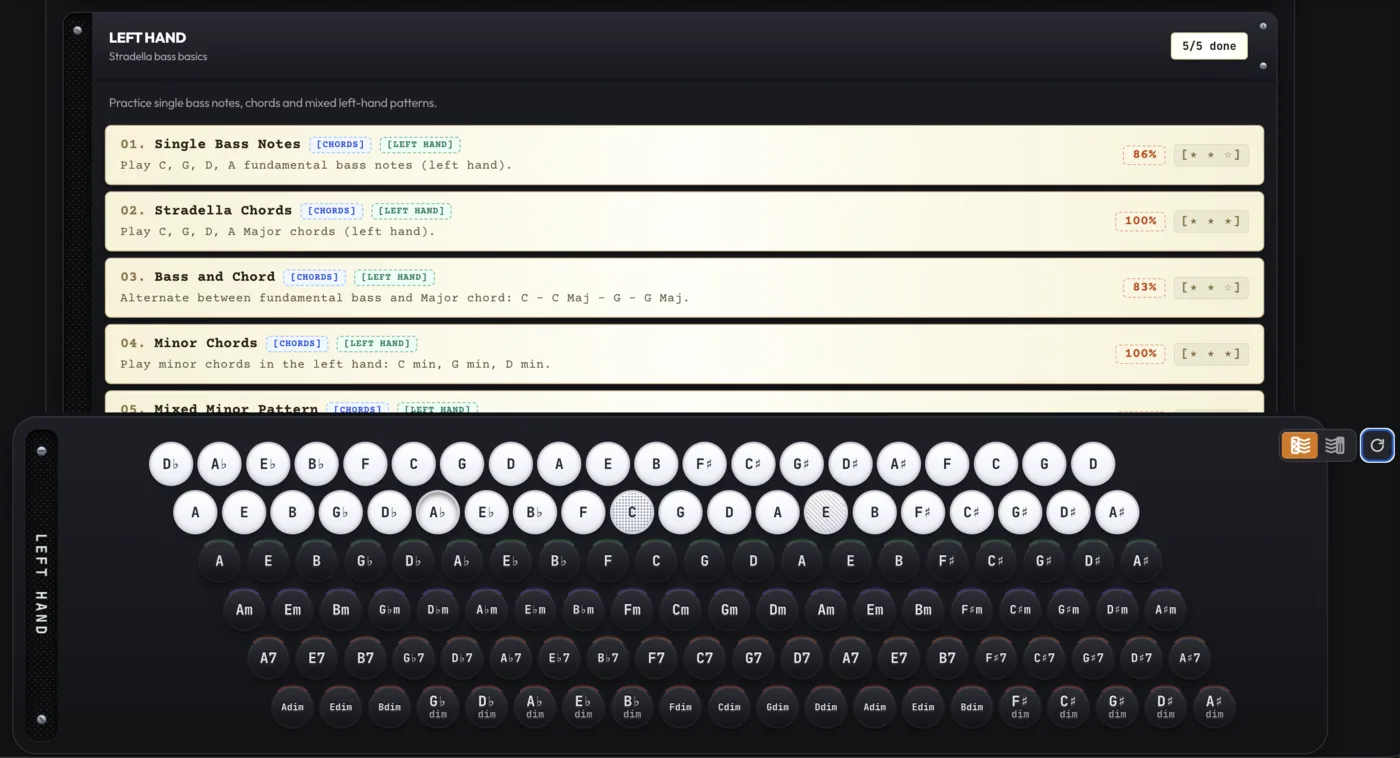
Stradella Bass Basics Course Selection List

Structured Bass Curriculum

Follow exercises designed for the left hand: from basic single bass rhythms to full major and minor chord progressions.
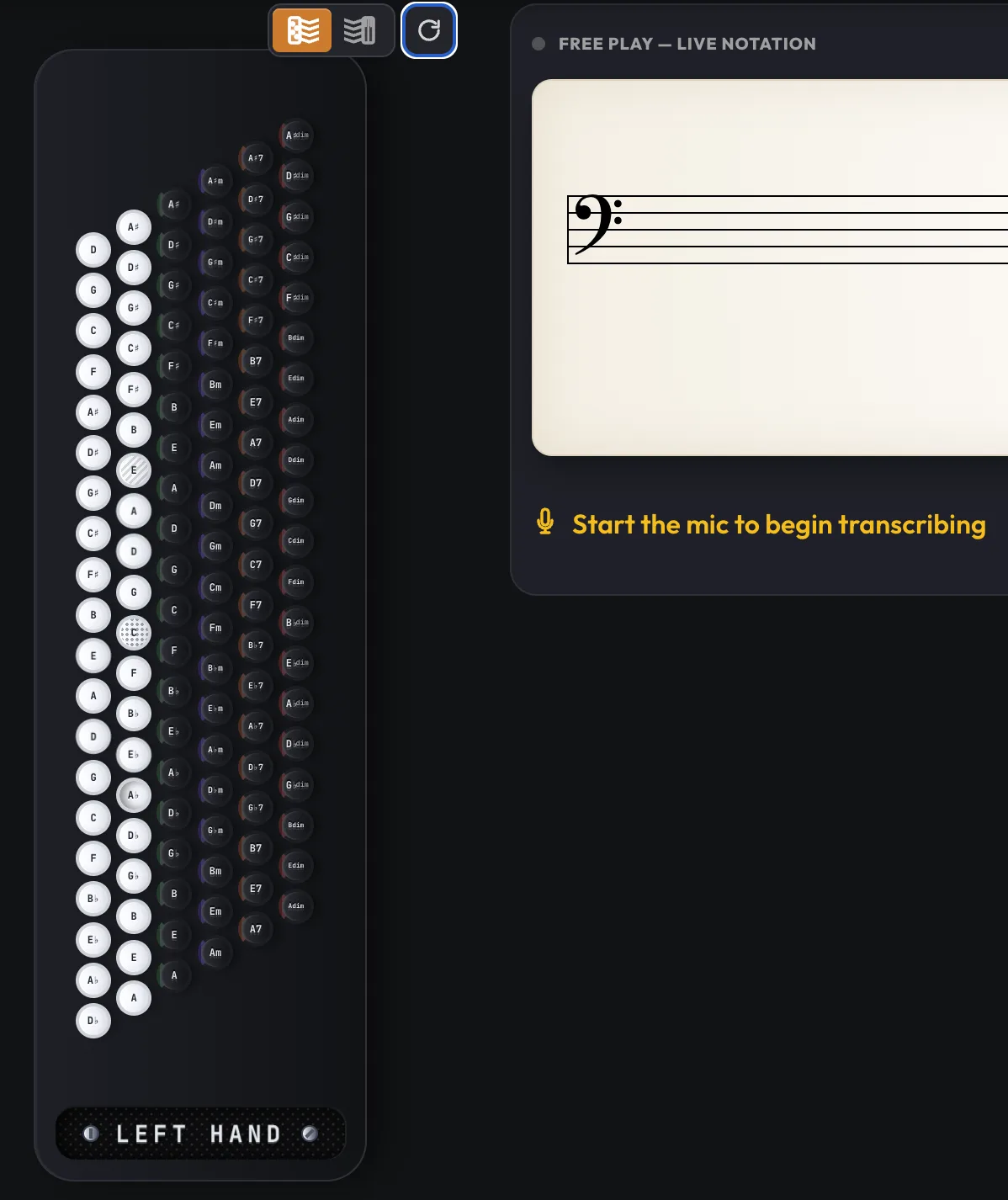
Vertical Stradella Bass Layout and Chord Recognition in Free Play

Stradella Bass Board

Interactive vertical 6-row Stradella keyboard mapping. Visualizes fundamental basses, counterbasses, and chords in real time.

Two Pillars, One Musical Journey

Accodrive connects hands-on acoustic practice with continuous offline exploration. Practice with your instrument on the music stand, or explore sheet music, theory, and expanding repertoire from any browser without an instrument.

With Instrument • Music Stand

Interactive Practice App

Your intelligent acoustic coach. Listens to your accordion reeds and verifies your pitch note-by-note in real time.

  • Real-Time Pitch Detection: Zero cables needed. The acoustic engine filters reed harmonics and ambient noise via your device microphone.
  • Visual Sound Maps: Button grids (C-System, B-System, Bayan) and piano keyboards highlight played and target notes instantly.
  • Interactive Score Feedback: Follow live stave notation with ergonomic fingerings, timing validation, and accuracy star ratings.
Launch Practice App
Without Instrument • Any Device

Accodrive Portal

Your accordion library and knowledge hub. Explore exercises, study sheet music, and discover new repertoire anytime.

  • Exercises & Repertoire: Browse scales, arpeggios, and songs with full stave previews, fingerboard guides, and fingering diagrams.
  • Expanding Knowledge Base: Successively expanded guides on accordion acoustics, bellows control, hand ergonomics, and system differences.
  • Regular Repertoire Additions: New traditional songs, carols, and classical arrangements continuously added to the library for all layouts.
Explore Portal

See Accodrive in action

Watch short clips and a full walkthrough: real-time pitch detection from your instrument's reeds, plus guided exercises, scales and melodies that light up the right keys exactly when you play them.

Accodrive Pro is in Development

Expanding the interactive trainer into a complete workstation for advanced musicians. Join the waitlist to shape features, vote on priorities, and get early access.

Chord Visualization

Real-time chord recognition, voicings and harmonic display across button and piano fingerboards.

Free Bass Support

Complete melodic left-hand coverage: Bayan, French and chromatic free bass systems.

MIDI & Digital Accordion

Plug in Roland, Bugari or MIDI accordions via USB/Bluetooth for zero-latency, noise-free detection.

Custom Songs & Cloud Sync

Import MusicXML / MIDI files to practice your own repertoire, and keep your progress synced across devices.

Be the first to try Accodrive Pro

Pre-registration is free and takes 10 seconds. Select the features you want most.

Join the Pro Waitlist

Frequently Asked Questions

Is it really free?

Yes, the "Lite" version of the application is feature-complete and fully functional. The included feature set should be more than sufficient for most accordionists.

Why are some features unavailable in the "Lite" version of the app?

Work is currently underway on a "Pro" version of the app. Although it is not ready yet, planned additional features include: chord visualization in Free Play mode, exercises in scales beyond major and minor, left-hand free bass support, MIDI integration, and many more features tailored for professional users. You can join the Accodrive Pro waitlist to vote for upcoming features and get notified upon release.

Is the "Pro" version also free?

No, the Pro version will be a paid/supporter version.

When will the "Pro" version be available?

There is no exact release date yet, but it should be ready in approximately a couple of months. Development is actively underway, and feedback is currently being gathered from the "Lite" version user base. Early access and pre-registration are available via the Accodrive Pro waitlist.

What exactly can I use this application for right now?

  1. Visualize what you are playing on your physical accordion – play a note and instantly see it highlighted along with the pressed button/key on the screen, using either the button or piano layout.
  2. Practice and perform exercises in major and minor scales – follow highlighted buttons/keys on the screen, use next-key hints, and get real-time feedback with green-highlighted notes on the scoreboard.
  3. Learn simple songs – using the exact same workflow as practicing scales and arpeggios.

System & Architecture Details

How to memorize the C-System accordion fingerboard map?
Use Accodrive's real-time sound map: play freely on your instrument and watch matching buttons light up on-screen. Repeated visual feedback builds spatial memory of the chromatic button accordion layout within a few practice sessions — no sheet music required.
How to practice chromatic button accordion without sheet music?
Accodrive's Free Play mode acts as an interactive accordion fingerboard trainer. Your microphone detects pitch in real time, highlighting the correct button on the on-screen grid so you can explore scales, arpeggios, and melodies by ear while building layout knowledge.
Can I use an interactive sound map for B-System Bayan practice?
Yes. Accodrive fully supports the B-System Bayan layout alongside C-System and Piano Accordion. Switch systems with one tap — the real-time pitch detection and fingerboard map adapt automatically to the mirrored button geometry of the B-System.
How does web-based microphone pitch detection work for accordion?
Accodrive uses the Web Audio API: a low-pass biquad filter dampens harmonics above ~800 Hz, an RMS threshold silences bellows noise, and a stability buffer confirms the pitch over several frames before updating the on-screen display — delivering accurate, flicker-free real-time detection.